CPU Cores, RAM, and Storage
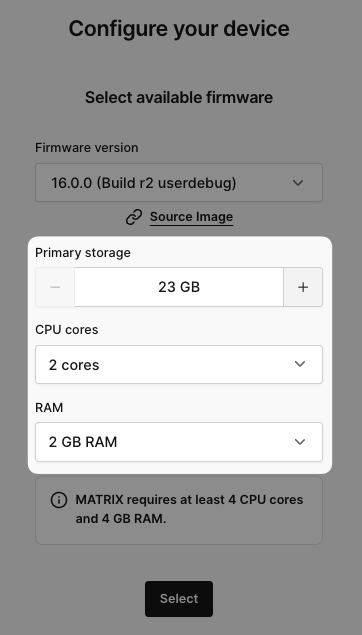
On applicable AVH devices (Android, Cortex-R52, etc), you can modify the underlying number of CPU cores and RAM allocated to your virtual device.

Modify CPU Cores and RAM
If your virtual device is ON, changing the hardware configuration will require a reboot.
To change your device's CPU or RAM:
- Click on the Settings tab then CPU & RAM.
- Change the preset values to your determined ones
- Click Save & Reboot to apply changes.
Android CPU Cores and RAM
The options for CPU cores on Android are:
- 8 cores
- 6 cores
- 4 cores
- 2 cores (default)
The options for RAM on Android are:
- 8 GB*, available with 8 or more CPU cores*
- 6 GB*, available with 6 or more CPU cores*
- 4 GB*, available with 4 or more CPU cores*
- 2 GB (default)
- 1 GB
Storage Configuration
note
You can configure your primary storage only at device creation time.
Android Storage Options
- Primary Storage: configurable 23GB – 45GB during device creation
- Storage cannot be changed after device is created
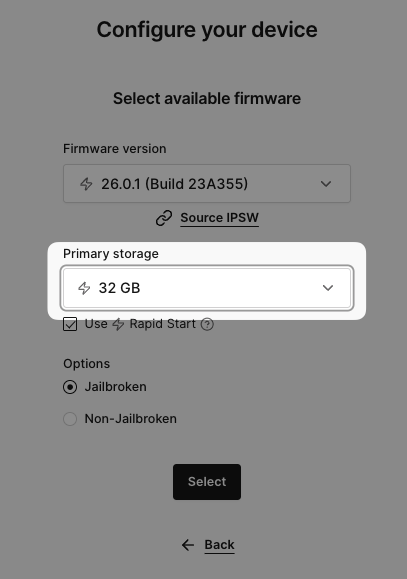
iOS Storage Options
- Primary Storage: choose 32GB, 64GB, or 128GB during device creation
- Storage cannot be changed after device is created